Procedural Pixel Art Building & City Generator (Aseprite)
A downloadable tool for Windows and Linux
🚦 Which generator should I choose?
Not sure which version fits your workflow? Here’s a quick comparison:
| Tool | Best for | What it does best |
|---|---|---|
| Office Generator | Beginners, game jams 🎯 | Quickly generate simple buildings with minimal setup |
| Building Generator | Pixel artists 🎨 | More control with multiple building types and roof variations |
| City Generator ⭐ Recommended | Game developers 🎮 & Pixel artists 🎨 | Generate full city scenes with depth, lighting, and layers |
⭐ City Generator is recommended if you are making game backgrounds or need large, consistent city scenes fast.
🏙️ Generate pixel art buildings or entire cities in one click
This tool helps you quickly block out buildings or full city backgrounds using procedural generation, while keeping everything fully editable in Aseprite.
Perfect for:
- Game backgrounds
- Parallax city layers
- Rapid prototyping
- Game jams and production pipelines
🏗️ Building Generator & City Generator include
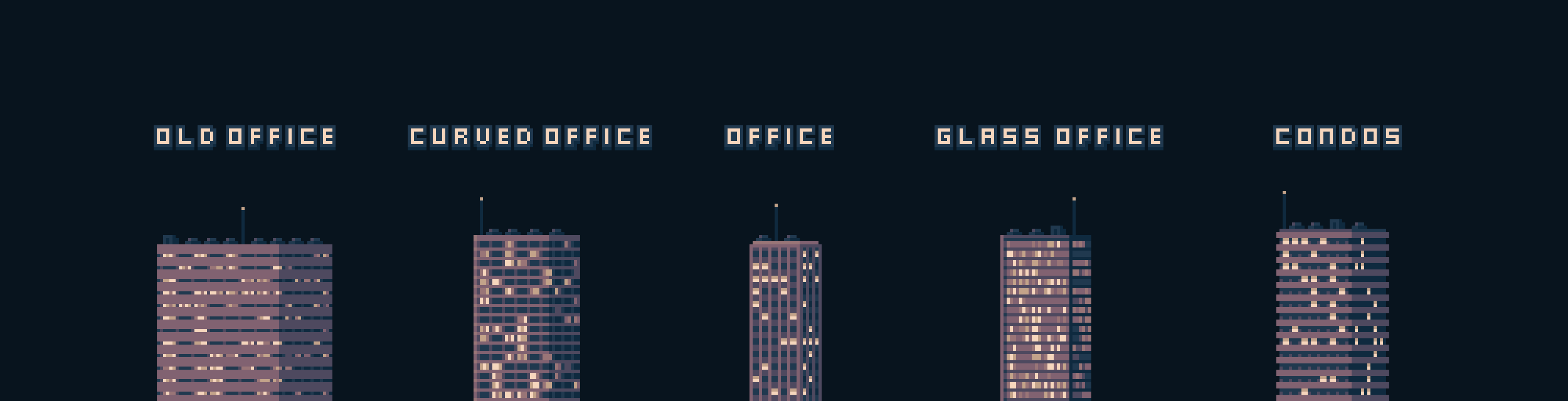
- 🏦 5 different building types
- 📡 4 roof / topping variations
- 🌆 Randomized height, lighting, and window patterns
- 🧱 Layered output — easy to edit, repaint, or polish by hand
- 🎲 Procedural generation with artist-friendly results
🎨 All versions support
- Load GPL color palettes and auto-sort by luminosity
- Easily adjust building height, window density, and light ratio
- Randomly shuffle lit windows for night scenes 🌙
- Use directly as an Aseprite script
⚡ Quick start (under 1 minute)
No setup, no configuration — generate results immediately.
- Put the script into your Aseprite Scripts folder
- Open Aseprite
- Create a new canvas (for example:
128×256) - Go to File → Scripts → City Generator
- Click Generate and start editing 🎨
😉 That’s it! You now have your own pixel art city. Congratulations!
📘 Detailed instructions with screenshots are available here:
Instruction of usage (beginner-friendly, expandable sections)
New to Aseprite scripts?
👉
How to install scripts in Aseprite
🎮 Designed for real production use
- Non-destructive workflow
- Editable pixel layers
- Procedural generation that supports creativity, not replaces it
- Ideal for both artists and game developers
🎨 Palette showcase
See how the generator works with all Lospec 8-color palettes:
https://vanviethieuanh.github.io/building-generator/
💡 Tip:
City Generator outputs buildings as grouped layers.
Stack multiple generated city groups with depth of field to create
deep, cinematic pixel art city backgrounds.
❓ What this tool is (and is not)
- ✅ A procedural generator to speed up pixel art workflows
- ✅ Fully editable output — paint, tweak, and polish by hand
- ❌ Not AI-generated art
Download
Click download now to get access to the following files:


Comments
Log in with itch.io to leave a comment.
Hey! I just bought the City Generator last night and it seems to work good as long as the AC units are selected but as soon as it becomes the rooftop doors or antennas, it freezes the program when I generate. Any advice? Thanks!
Hello Xavvier,
First, I apologize for the inconvenience. I hope you did not lose any art because of the crash. I already fixed the error and updated both the Building Generator and the City Generator file. I think since you have already bought it, you can download the new version now. (You can find the "Version: 1.0.1" in the script file)
And secondly, I apologize for the late reply and fixing. I have had to deal with a lot of problems in recent months, and I just saw the message in the last couple of hours.
Thank you for your support and bigger thanks for the bug report.
🥰 I appreciate!
The error is caused because AC units are the only element that is repeatedly on top of the building. So if we do not create it, there are only one antenna and one door which cannot fill up the building roof. The roof fill-up is the stop condition for the draw topping function, so it cannot stop which causes Aseprite freeze. I just added another break condition when it no longer needs to draw so it solved the error.
When I fixed this error, there was also another bug that only drew 1 antenna and 1 door for each time the tool ran.
Finally, hope you enjoy the tool!
This is a great little tool. You can try it out and see how it works for youfor free with the single building maker but honestly if this kind of tool seems at all useful to you (it does fill a sort of niche need, granted) I would say it's worth the five bucks just to get the city builder. Fun idea, simple and elegant implementation. No notes. I love it.
Thank you (✿◡‿◡)
Hello, your asset looks fantastic! Can we use it for commercial projects? :)
Sure :>
I would appreciate it if you share the project here when you are done 🥰
Thank you for your dedication.
iu :>
Good idea nice job.
Thanks, man!